深度強化學習課程文件
實戰

並獲得增強的文件體驗
開始使用
實踐


現在我們已經學習了 Q-學習演算法,接下來我們將從頭開始實現它,並在兩個環境中訓練我們的 Q-學習智慧體
- Frozen-Lake-v1(非溼滑和溼滑版本) ☃️:我們的智慧體需要**從起始狀態(S)到達目標狀態(G)**,只能在冰凍的方塊(F)上行走,並避開洞(H)。
- 一輛自動計程車 🚖 需要**學習如何在城市中導航**,將**乘客從A點運送到B點。**

多虧了排行榜,你將能夠與同學比較你的結果,並交流最佳實踐來提高你智慧體的分數。誰將贏得第二單元的挑戰?
為了透過認證流程的實踐部分,你需要將訓練好的 Taxi 模型推送到 Hub,並且**獲得 >= 4.5 的結果**。
要檢視你的結果,請訪問排行榜,找到你的模型,**結果 = 平均獎勵 - 獎勵標準差**
有關認證過程的更多資訊,請檢視此部分 👉 https://huggingface.co/deep-rl-course/en/unit0/introduction#certification-process
你可以在這裡檢視你的進度 👉 https://huggingface.co/spaces/ThomasSimonini/Check-my-progress-Deep-RL-Course
**要開始實踐,請點選“在 Colab 中開啟”按鈕** 👇
我們強烈**建議學生使用 Google Colab 進行實踐練習**,而不是在個人電腦上執行。
使用 Google Colab,**您可以專注於學習和實驗,而無需擔心環境設定的技術問題。**
單元2:Q-學習與FrozenLake-v1 ⛄ 和Taxi-v3 🚕

在本筆記中,**您將從頭開始編寫第一個強化學習代理**,以使用 Q-學習翫 FrozenLake ❄️,並將其分享給社群,並嘗試不同的配置。
⬇️ 以下是**您在幾分鐘內就能實現**的示例。⬇️
🎮 環境:
📚 強化學習庫:
- Python 和 NumPy
- Gymnasium
我們正在不斷努力改進我們的教程,因此,**如果您在本筆記本中發現任何問題**,請在 GitHub 倉庫上提出問題。
本筆記本的目標 🏆
在本筆記本結束時,您將:
- 能夠使用**Gymnasium**,一個環境庫。
- 能夠從頭開始編寫一個 Q-學習代理。
- 能夠將你訓練好的智慧體和程式碼上傳到 Hub,並附帶精彩的影片回放和評估分數 🔥。
本筆記節選自深度強化學習課程

在這門免費課程中,你將:
- 📖 **理論與實踐**地學習深度強化學習。
- 🧑💻 學習**使用著名的深度強化學習庫**,如 Stable Baselines3、RL Baselines3 Zoo、CleanRL 和 Sample Factory 2.0。
- 🤖 在**獨特環境中訓練智慧體**
更多內容請查閱 📚 課程大綱 👉 https://simoninithomas.github.io/deep-rl-course
別忘了**報名課程**(我們正在收集您的電子郵件,以便**在每個單元釋出時向您傳送連結,並向您提供有關挑戰和更新的資訊**)。
保持聯絡的最佳方式是加入我們的 Discord 伺服器,與社群和我們交流 👉🏻 https://discord.gg/ydHrjt3WP5
先決條件 🏗️
在深入學習本筆記本之前,您需要:
🔲 📚 **透過閱讀第二單元來學習Q-學習** 🤗
Q-學習小結
Q-學習**是一種強化學習演算法,它**
訓練*Q 函式*,這是一種**動作價值函式**,它在內部儲存中透過*Q 表*編碼,**Q 表包含所有狀態-動作對的值。**
給定一個狀態和動作,我們的 Q 函式**將搜尋 Q 表以找到相應的值。**

當訓練完成後,**我們得到了一個最優的Q函式,也就是一個最優的Q表。**
如果**我們有一個最優的 Q 函式**,那麼我們也就有了一個最優策略,因為我們**知道在每個狀態下應該採取的最佳行動。**

然而,一開始,我們的**Q表是無用的,因為它為每個狀態-動作對提供了任意值(大多數情況下,我們將Q表初始化為0值)**。但是,隨著我們探索環境並更新Q表,它將為我們提供越來越好的近似。

這是Q-Learning的虛擬碼

讓我們編寫第一個強化學習演算法 🚀
為了透過認證流程的實踐部分,你需要將訓練好的 Taxi 模型推送到 Hub,並且**獲得 >= 4.5 的結果**。
要檢視你的結果,請訪問排行榜,找到你的模型,**結果 = 平均獎勵 - 獎勵標準差**
有關認證過程的更多資訊,請檢視此部分 👉 https://huggingface.co/deep-rl-course/en/unit0/introduction#certification-process
安裝依賴項並建立虛擬顯示器 🔽
在筆記本中,我們需要生成一個重放影片。為此,使用 Colab,**我們需要一個虛擬螢幕來渲染環境**(並因此記錄幀)。
因此,以下單元格將安裝庫並建立並執行一個虛擬螢幕 🖥
我們將安裝多個:
gymnasium:包含 FrozenLake-v1 ⛄ 和 Taxi-v3 🚕 環境。pygame:用於 FrozenLake-v1 和 Taxi-v3 UI。numpy:用於處理我們的 Q 表。
Hugging Face Hub 🤗 作為一箇中心平臺,任何人都可以共享和探索模型和資料集。它擁有版本控制、指標、視覺化以及其他功能,讓您能夠輕鬆地與他人協作。
您可以在這裡檢視所有可用的深度強化學習模型(如果它們使用 Q 學習)👉 https://huggingface.co/models?other=q-learning
pip install -r https://raw.githubusercontent.com/huggingface/deep-rl-class/main/notebooks/unit2/requirements-unit2.txt
sudo apt-get update
sudo apt-get install -y python3-opengl
apt install ffmpeg xvfb
pip3 install pyvirtualdisplay
為確保新安裝的庫能被使用,**有時需要重新啟動筆記本執行時**。下一個單元格將強制**執行時崩潰,因此您需要重新連線並從此處開始執行程式碼**。透過這個技巧,**我們將能夠執行我們的虛擬螢幕。**
import os

os.kill(os.getpid(), 9)# Virtual display
from pyvirtualdisplay import Display
virtual_display = Display(visible=0, size=(1400, 900))
virtual_display.start()匯入包 📦
除了已安裝的庫,我們還使用
random:生成隨機數(對 epsilon-greedy 策略有用)。imageio:生成重放影片。
import numpy as np
import gymnasium as gym
import random
import imageio
import os
import tqdm

import pickle5 as pickle
from tqdm.notebook import tqdm
我們現在準備好編寫我們的 Q-學習演算法了 🔥
第一部分:冰凍湖 ⛄ (非溼滑版)
建立和理解 FrozenLake 環境 ⛄ ( https://gymnasium.llms.tw/environments/toy_text/frozen_lake/ )
💡 開始使用環境時,一個好習慣是檢視其文件
👉 https://gymnasium.llms.tw/environments/toy_text/frozen_lake/
我們將訓練我們的 Q-學習智慧體**從起始狀態(S)導航到目標狀態(G),只在冰凍的瓷磚(F)上行走並避開洞(H)**。
我們可以有兩種大小的環境
map_name="4x4":4x4 網格版本map_name="8x8":8x8 網格版本
該環境有兩種模式
is_slippery=False:由於冰凍湖泊的非溼滑性(確定性),智慧體總是**按預期方向**移動。is_slippery=True:由於冰凍湖的溼滑特性(隨機性),智慧體**可能不會總是按預期方向移動**。
現在我們先用4x4的非溼滑地圖,簡單點。我們新增一個名為render_mode的引數,用於指定環境的視覺化方式。在本例中,因為我們**想在最後錄製環境的影片,所以需要將render_mode設定為rgb_array**。
正如文件中所述,“rgb_array”:返回一個表示環境當前狀態的單幀。一幀是一個形狀為(x, y, 3)的np.ndarray,表示x乘y畫素影像的RGB值。
# Create the FrozenLake-v1 environment using 4x4 map and non-slippery version and render_mode="rgb_array"
env = gym.make()  # TODO use the correct parameters
解決方案
env = gym.make("FrozenLake-v1", map_name="4x4", is_slippery=False, render_mode="rgb_array")您可以像這樣建立自己的自定義網格
desc=["SFFF", "FHFH", "FFFH", "HFFG"]
gym.make('FrozenLake-v1', desc=desc, is_slippery=True)
但我們現在將使用預設環境。
讓我們看看環境是怎樣的:
# We create our environment with gym.make("<name_of_the_environment>")- `is_slippery=False`: The agent always moves in the intended direction due to the non-slippery nature of the frozen lake (deterministic).
print("_____OBSERVATION SPACE_____ \n")
print("Observation Space", env.observation_space)
print("Sample observation", env.observation_space.sample())  # Get a random observation
我們看到`Observation Space Shape Discrete(16)`表示觀察是一個整數,代表**智慧體的當前位置為 current_row * ncols + current_col(其中行和列都從0開始)**。
例如,4x4 地圖中的目標位置可以計算為:3 * 4 + 3 = 15。可能的觀察數量取決於地圖的大小。**例如,4x4 地圖有 16 種可能的觀察。**
例如,狀態 = 0 看起來像這樣

print("\n _____ACTION SPACE_____ \n")
print("Action Space Shape", env.action_space.n)
print("Action Space Sample", env.action_space.sample())  # Take a random action
動作空間(智慧體可以採取的可能動作集合)是離散的,有 4 個可用動作 🎮
- 0:向左走
- 1:向下走
- 2:向右走
- 3:向上走
獎勵函式 💰
- 到達目標:+1
- 掉入洞中:0
- 到達冰面:0
建立並初始化 Q 表 🗄️
(👀 虛擬碼步驟 1)
是時候初始化我們的Q表了!為了知道要使用多少行(狀態)和列(動作),我們需要知道動作空間和觀察空間。我們之前已經知道了它們的值,但我們希望以程式設計方式獲取它們,以便我們的演算法能夠適用於不同的環境。Gym 為我們提供了一種方法:`env.action_space.n` 和 `env.observation_space.n`
state_space =
print("There are ", state_space, " possible states")

action_space =
print("There are ", action_space, " possible actions")# Let's create our Qtable of size (state_space, action_space) and initialized each values at 0 using np.zeros. np.zeros needs a tuple (a,b)
def initialize_q_table(state_space, action_space):
Qtable =
return QtableQtable_frozenlake = initialize_q_table(state_space, action_space)
解決方案
state_space = env.observation_space.n
print("There are ", state_space, " possible states")

action_space = env.action_space.n
print("There are ", action_space, " possible actions")# Let's create our Qtable of size (state_space, action_space) and initialized each values at 0 using np.zeros
def initialize_q_table(state_space, action_space):
Qtable = np.zeros((state_space, action_space))
return QtableQtable_frozenlake = initialize_q_table(state_space, action_space)
定義貪婪策略 🤖
請記住,我們有兩種策略,因為Q-學習是一種**離策略(off-policy)**演算法。這意味著我們**使用不同的策略來執行動作和更新價值函式**。
- ε-貪婪策略(行動策略)
- 貪婪策略(更新策略)
貪婪策略也將是我們Q-學習智慧體完成訓練後的最終策略。貪婪策略用於使用Q表選擇動作。

def greedy_policy(Qtable, state):
  # Exploitation: take the action with the highest state, action value
  action =

  return action
解決方案
def greedy_policy(Qtable, state):
    # Exploitation: take the action with the highest state, action value
    action = np.argmax(Qtable[state][:])

    return action
定義ε-貪婪策略 🤖
ε-貪婪是處理探索/利用權衡的訓練策略。
ε-貪婪的想法是:
有*1-ɛ的機率*:**我們進行利用**(即我們的代理選擇具有最高狀態-動作對價值的動作)。
有*ε的機率*:我們進行**探索**(嘗試一個隨機動作)。
隨著訓練的進行,我們逐漸**減小epsilon值,因為我們將越來越少地需要探索,而更多地需要利用。**

def epsilon_greedy_policy(Qtable, state, epsilon):
  # Randomly generate a number between 0 and 1
  random_num =
  # if random_num > greater than epsilon --> exploitation
  if random_num > epsilon:
    # Take the action with the highest value given a state
    # np.argmax can be useful here
    action =
  # else --> exploration
  else:
    action = # Take a random action

  return action
解決方案
def epsilon_greedy_policy(Qtable, state, epsilon):
    # Randomly generate a number between 0 and 1
    random_num = random.uniform(0, 1)
    # if random_num > greater than epsilon --> exploitation
    if random_num > epsilon:
        # Take the action with the highest value given a state
        # np.argmax can be useful here
        action = greedy_policy(Qtable, state)
    # else --> exploration
    else:
        action = env.action_space.sample()

    return action
定義超引數 ⚙️
與探索相關的超引數是其中最重要的。
- 我們需要確保我們的智慧體**充分探索了狀態空間**以學習一個好的價值近似。為此,我們需要逐步衰減epsilon。
- 如果epsilon衰減過快(衰減率過高),**你的智慧體就有可能陷入困境**,因為它沒有充分探索狀態空間,因此無法解決問題。
# Training parameters
n_training_episodes = 10000  # Total training episodes
learning_rate = 0.7  # Learning rate

# Evaluation parameters
n_eval_episodes = 100  # Total number of test episodes

# Environment parameters
env_id = "FrozenLake-v1"  # Name of the environment
max_steps = 99  # Max steps per episode
gamma = 0.95  # Discounting rate
eval_seed = []  # The evaluation seed of the environment

# Exploration parameters
max_epsilon = 1.0  # Exploration probability at start
min_epsilon = 0.05  # Minimum exploration probability
decay_rate = 0.0005  # Exponential decay rate for exploration prob
建立訓練迴圈方法
訓練迴圈是這樣的
For episode in the total of training episodes:

Reduce epsilon (since we need less and less exploration)
Reset the environment

  For step in max timesteps:
    Choose the action At using epsilon greedy policy
    Take the action (a) and observe the outcome state(s') and reward (r)
    Update the Q-value Q(s,a) using Bellman equation Q(s,a) + lr [R(s,a) + gamma * max Q(s',a') - Q(s,a)]
    If done, finish the episode
Our next state is the new statedef train(n_training_episodes, min_epsilon, max_epsilon, decay_rate, env, max_steps, Qtable):
for episode in tqdm(range(n_training_episodes)):
# Reduce epsilon (because we need less and less exploration)
epsilon = min_epsilon + (max_epsilon - min_epsilon)*np.exp(-decay_rate*episode)
# Reset the environment
state, info = env.reset()
step = 0
terminated = False
truncated = False
# repeat
for step in range(max_steps):
# Choose the action At using epsilon greedy policy
action =
# Take action At and observe Rt+1 and St+1
# Take the action (a) and observe the outcome state(s') and reward (r)
new_state, reward, terminated, truncated, info =
# Update Q(s,a):= Q(s,a) + lr [R(s,a) + gamma * max Q(s',a') - Q(s,a)]
Qtable[state][action] =
# If terminated or truncated finish the episode
if terminated or truncated:
break
# Our next state is the new state
state = new_state
return Qtable解決方案
def train(n_training_episodes, min_epsilon, max_epsilon, decay_rate, env, max_steps, Qtable):
    for episode in tqdm(range(n_training_episodes)):
        # Reduce epsilon (because we need less and less exploration)
        epsilon = min_epsilon + (max_epsilon - min_epsilon) * np.exp(-decay_rate * episode)
        # Reset the environment
        state, info = env.reset()
        step = 0
        terminated = False
        truncated = False

        # repeat
        for step in range(max_steps):
            # Choose the action At using epsilon greedy policy
            action = epsilon_greedy_policy(Qtable, state, epsilon)

            # Take action At and observe Rt+1 and St+1
            # Take the action (a) and observe the outcome state(s') and reward (r)
            new_state, reward, terminated, truncated, info = env.step(action)

            # Update Q(s,a):= Q(s,a) + lr [R(s,a) + gamma * max Q(s',a') - Q(s,a)]
            Qtable[state][action] = Qtable[state][action] + learning_rate * (
                reward + gamma * np.max(Qtable[new_state]) - Qtable[state][action]
            )

            # If terminated or truncated finish the episode
            if terminated or truncated:
                break

            # Our next state is the new state
            state = new_state
    return Qtable
訓練Q-學習智慧體 🏃
Qtable_frozenlake = train(n_training_episodes, min_epsilon, max_epsilon, decay_rate, env, max_steps, Qtable_frozenlake)
現在來看看我們的Q-學習表長什麼樣 👀
Qtable_frozenlake
評估方法 📝
- 我們定義了將用於測試Q-學習智慧體的評估方法。
def evaluate_agent(env, max_steps, n_eval_episodes, Q, seed):
    """
    Evaluate the agent for ``n_eval_episodes`` episodes and returns average reward and std of reward.
    :param env: The evaluation environment
    :param n_eval_episodes: Number of episode to evaluate the agent
    :param Q: The Q-table
    :param seed: The evaluation seed array (for taxi-v3)
    """
    episode_rewards = []
    for episode in tqdm(range(n_eval_episodes)):
        if seed:
            state, info = env.reset(seed=seed[episode])
        else:
            state, info = env.reset()
        step = 0
        truncated = False
        terminated = False
        total_rewards_ep = 0

        for step in range(max_steps):
            # Take the action (index) that have the maximum expected future reward given that state
            action = greedy_policy(Q, state)
            new_state, reward, terminated, truncated, info = env.step(action)
            total_rewards_ep += reward

            if terminated or truncated:
                break
            state = new_state
        episode_rewards.append(total_rewards_ep)
    mean_reward = np.mean(episode_rewards)
    std_reward = np.std(episode_rewards)

    return mean_reward, std_reward
評估我們的 Q-學習智慧體 📈
- 通常,您應該獲得 1.0 的平均獎勵
- 這個**環境相對簡單**,因為狀態空間非常小(16個)。你可以嘗試**替換為溼滑版本**,這會引入隨機性,使環境更復雜。
# Evaluate our Agent
mean_reward, std_reward = evaluate_agent(env, max_steps, n_eval_episodes, Qtable_frozenlake, eval_seed)
print(f"Mean_reward={mean_reward:.2f} +/- {std_reward:.2f}")
將我們訓練好的模型釋出到 Hub 🔥
現在我們已經看到訓練後的良好結果,**我們可以用一行程式碼將我們訓練好的模型釋出到 Hub 🤗**。
這是一個模型卡的例子

在底層,Hub 使用基於 Git 的倉庫(如果你不瞭解 Git,別擔心),這意味著你可以在實驗並改進智慧體時使用新版本更新模型。
請勿修改此程式碼
from huggingface_hub import HfApi, snapshot_download
from huggingface_hub.repocard import metadata_eval_result, metadata_save

from pathlib import Path
import datetime
import jsondef record_video(env, Qtable, out_directory, fps=1):
"""
Generate a replay video of the agent
:param env
:param Qtable: Qtable of our agent
:param out_directory
:param fps: how many frame per seconds (with taxi-v3 and frozenlake-v1 we use 1)
"""
images = []
terminated = False
truncated = False
state, info = env.reset(seed=random.randint(0, 500))
img = env.render()
images.append(img)
while not terminated or truncated:
# Take the action (index) that have the maximum expected future reward given that state
action = np.argmax(Qtable[state][:])
state, reward, terminated, truncated, info = env.step(
action
) # We directly put next_state = state for recording logic
img = env.render()
images.append(img)
imageio.mimsave(out_directory, [np.array(img) for i, img in enumerate(images)], fps=fps)def push_to_hub(repo_id, model, env, video_fps=1, local_repo_path="hub"):
"""
Evaluate, Generate a video and Upload a model to Hugging Face Hub.
This method does the complete pipeline:
- It evaluates the model
- It generates the model card
- It generates a replay video of the agent
- It pushes everything to the Hub
:param repo_id: repo_id: id of the model repository from the Hugging Face Hub
:param env
:param video_fps: how many frame per seconds to record our video replay
(with taxi-v3 and frozenlake-v1 we use 1)
:param local_repo_path: where the local repository is
"""
_, repo_name = repo_id.split("/")
eval_env = env
api = HfApi()
# Step 1: Create the repo
repo_url = api.create_repo(
repo_id=repo_id,
exist_ok=True,
)
# Step 2: Download files
repo_local_path = Path(snapshot_download(repo_id=repo_id))
# Step 3: Save the model
if env.spec.kwargs.get("map_name"):
model["map_name"] = env.spec.kwargs.get("map_name")
if env.spec.kwargs.get("is_slippery", "") == False:
model["slippery"] = False
# Pickle the model
with open((repo_local_path) / "q-learning.pkl", "wb") as f:
pickle.dump(model, f)
# Step 4: Evaluate the model and build JSON with evaluation metrics
mean_reward, std_reward = evaluate_agent(
eval_env, model["max_steps"], model["n_eval_episodes"], model["qtable"], model["eval_seed"]
)
evaluate_data = {
"env_id": model["env_id"],
"mean_reward": mean_reward,
"n_eval_episodes": model["n_eval_episodes"],
"eval_datetime": datetime.datetime.now().isoformat(),
}
# Write a JSON file called "results.json" that will contain the
# evaluation results
with open(repo_local_path / "results.json", "w") as outfile:
json.dump(evaluate_data, outfile)
# Step 5: Create the model card
env_name = model["env_id"]
if env.spec.kwargs.get("map_name"):
env_name += "-" + env.spec.kwargs.get("map_name")
if env.spec.kwargs.get("is_slippery", "") == False:
env_name += "-" + "no_slippery"
metadata = {}
metadata["tags"] = [env_name, "q-learning", "reinforcement-learning", "custom-implementation"]
# Add metrics
eval = metadata_eval_result(
model_pretty_name=repo_name,
task_pretty_name="reinforcement-learning",
task_id="reinforcement-learning",
metrics_pretty_name="mean_reward",
metrics_id="mean_reward",
metrics_value=f"{mean_reward:.2f} +/- {std_reward:.2f}",
dataset_pretty_name=env_name,
dataset_id=env_name,
)
# Merges both dictionaries
metadata = {**metadata, **eval}
model_card = f"""
# **Q-Learning** Agent playing1 **{env_id}**
This is a trained model of a **Q-Learning** agent playing **{env_id}** .
## Usage
model = load_from_hub(repo_id="{repo_id}", filename="q-learning.pkl")
# Don't forget to check if you need to add additional attributes (is_slippery=False etc)
env = gym.make(model["env_id"])
"""
evaluate_agent(env, model["max_steps"], model["n_eval_episodes"], model["qtable"], model["eval_seed"])
readme_path = repo_local_path / "README.md"
readme = ""
print(readme_path.exists())
if readme_path.exists():
with readme_path.open("r", encoding="utf8") as f:
readme = f.read()
else:
readme = model_card
with readme_path.open("w", encoding="utf-8") as f:
f.write(readme)
# Save our metrics to Readme metadata
metadata_save(readme_path, metadata)
# Step 6: Record a video
video_path = repo_local_path / "replay.mp4"
record_video(env, model["qtable"], video_path, video_fps)
# Step 7. Push everything to the Hub
api.upload_folder(
repo_id=repo_id,
folder_path=repo_local_path,
path_in_repo=".",
)
print("Your model is pushed to the Hub. You can view your model here: ", repo_url).
透過使用push_to_hub,您**可以評估、錄製回放、生成代理的模型卡並將其推送到Hub**。
透過這種方式
- 你可以展示我們的工作 🔥
- 你可以視覺化你的智慧體在玩遊戲 👀
- 您可以**與社群共享一個代理,其他人可以使用** 💾
- 您可以**訪問排行榜 🏆,檢視您的智慧體與同學相比的表現** 👉 https://huggingface.co/spaces/huggingface-projects/Deep-Reinforcement-Learning-Leaderboard
為了能夠與社群分享你的模型,還需要完成三個步驟
1️⃣ (如果尚未完成)建立 HF 帳戶 ➡ https://huggingface.co/join
2️⃣ 登入後,你需要從 Hugging Face 網站儲存你的身份驗證令牌。
- 建立一個新令牌(https://huggingface.co/settings/tokens),並賦予寫入許可權

from huggingface_hub import notebook_login

notebook_login()
如果您不想使用 Google Colab 或 Jupyter Notebook,則需要使用以下命令:`huggingface-cli login`(或`login`)
3️⃣ 我們現在準備好使用 `push_to_hub()` 函式將我們訓練好的代理推送到 🤗 Hub 🔥
- 我們來建立**包含超引數和 Q_table 的模型字典**。
model = {
    "env_id": env_id,
    "max_steps": max_steps,
    "n_training_episodes": n_training_episodes,
    "n_eval_episodes": n_eval_episodes,
    "eval_seed": eval_seed,
    "learning_rate": learning_rate,
    "gamma": gamma,
    "max_epsilon": max_epsilon,
    "min_epsilon": min_epsilon,
    "decay_rate": decay_rate,
    "qtable": Qtable_frozenlake,
}
讓我們填寫 `push_to_hub` 函式
repo_id:將要建立/更新的 Hugging Face Hub 儲存庫的名稱 `(repo_id = {username}/{repo_name})` 💡 一個好的 `repo_id` 是 `{username}/q-{env_id}`model:包含超引數和Q表的模型字典。env:環境。commit_message:提交訊息
model
username = ""  # FILL THIS
repo_name = "q-FrozenLake-v1-4x4-noSlippery"
push_to_hub(repo_id=f"{username}/{repo_name}", model=model, env=env)
恭喜 🥳 您剛剛從頭開始實現、訓練並上傳了您的第一個強化學習代理。FrozenLake-v1 non_slippery 是一個非常簡單的環境,讓我們嘗試一個更難的 🔥。
第二部分:計程車-v3 🚖
建立和理解 Taxi-v3 🚕
💡 開始使用環境時,一個好習慣是檢視其文件
👉 https://gymnasium.llms.tw/environments/toy_text/taxi/
在 `Taxi-v3` 🚕 中,網格世界中有四個指定位置,用 R(紅色)、G(綠色)、Y(黃色)和 B(藍色)表示。
當劇集開始時,**計程車從一個隨機方格開始**,乘客也在一個隨機位置。計程車開到乘客所在位置,**接上乘客**,開到乘客目的地(四個指定位置中的另一個),然後**放下乘客**。乘客下車後,劇集結束。

env = gym.make("Taxi-v3", render_mode="rgb_array")由於有25個計程車位置、5個乘客可能位置(包括乘客在出租車內的情況)和4個目的地位置,因此有**500個離散狀態。**
state_space = env.observation_space.n
print("There are ", state_space, " possible states")action_space = env.action_space.n
print("There are ", action_space, " possible actions")動作空間(代理可以採取的可能動作集合)是離散的,有**6個可用動作 🎮**
- 0:向南移動
- 1:向北移動
- 2:向東移動
- 3:向西移動
- 4:接載乘客
- 5:放下乘客
獎勵函式 💰
- 每步 -1,除非觸發其他獎勵。
- 交付乘客 +20。
- 非法執行“接載”和“下車”操作 -10。
# Create our Q table with state_size rows and action_size columns (500x6)
Qtable_taxi = initialize_q_table(state_space, action_space)
print(Qtable_taxi)
print("Q-table shape: ", Qtable_taxi.shape)
定義超引數 ⚙️
⚠ 不要修改 EVAL_SEED:eval_seed 陣列**允許我們用相同的計程車起始位置評估你的智慧體,以確保每個同學的評估一致**
# Training parameters
n_training_episodes = 25000  # Total training episodes
learning_rate = 0.7  # Learning rate

# Evaluation parameters
n_eval_episodes = 100  # Total number of test episodes

# DO NOT MODIFY EVAL_SEED
eval_seed = [
    16,
    54,
    165,
    177,
    191,
    191,
    120,
    80,
    149,
    178,
    48,
    38,
    6,
    125,
    174,
    73,
    50,
    172,
    100,
    148,
    146,
    6,
    25,
    40,
    68,
    148,
    49,
    167,
    9,
    97,
    164,
    176,
    61,
    7,
    54,
    55,
    161,
    131,
    184,
    51,
    170,
    12,
    120,
    113,
    95,
    126,
    51,
    98,
    36,
    135,
    54,
    82,
    45,
    95,
    89,
    59,
    95,
    124,
    9,
    113,
    58,
    85,
    51,
    134,
    121,
    169,
    105,
    21,
    30,
    11,
    50,
    65,
    12,
    43,
    82,
    145,
    152,
    97,
    106,
    55,
    31,
    85,
    38,
    112,
    102,
    168,
    123,
    97,
    21,
    83,
    158,
    26,
    80,
    63,
    5,
    81,
    32,
    11,
    28,
    148,
]  # Evaluation seed, this ensures that all classmates agents are trained on the same taxi starting position
# Each seed has a specific starting state

# Environment parameters
env_id = "Taxi-v3"  # Name of the environment
max_steps = 99  # Max steps per episode
gamma = 0.95  # Discounting rate

# Exploration parameters
max_epsilon = 1.0  # Exploration probability at start
min_epsilon = 0.05  # Minimum exploration probability
decay_rate = 0.005  # Exponential decay rate for exploration prob
訓練我們的Q-學習智慧體 🏃
Qtable_taxi = train(n_training_episodes, min_epsilon, max_epsilon, decay_rate, env, max_steps, Qtable_taxi)
Qtable_taxi
建立模型字典 💾 並將我們訓練好的模型釋出到 Hub 🔥
- 我們建立了一個模型字典,其中將包含所有訓練超引數以實現可復現性以及 Q-表。
model = {
    "env_id": env_id,
    "max_steps": max_steps,
    "n_training_episodes": n_training_episodes,
    "n_eval_episodes": n_eval_episodes,
    "eval_seed": eval_seed,
    "learning_rate": learning_rate,
    "gamma": gamma,
    "max_epsilon": max_epsilon,
    "min_epsilon": min_epsilon,
    "decay_rate": decay_rate,
    "qtable": Qtable_taxi,
}username = "" # FILL THIS
repo_name = "" # FILL THIS
push_to_hub(repo_id=f"{username}/{repo_name}", model=model, env=env)現在它已經在 Hub 上了,您可以使用排行榜 🏆 將您的 Taxi-v3 結果與您的同學進行比較 👉 https://huggingface.co/spaces/huggingface-projects/Deep-Reinforcement-Learning-Leaderboard

第三部分:從 Hub 載入 🔽
Hugging Face Hub 🤗 的驚人之處在於,您可以輕鬆載入社群中的強大模型。
從 Hub 載入儲存的模型非常簡單
- 您可以訪問https://huggingface.co/models?other=q-learning檢視所有Q-學習儲存的模型列表。
- 您選擇一個並複製其repo_id

- 然後我們只需要使用 `load_from_hub`,引數為:
- repo_id
- 檔名:倉庫中儲存的模型。
請勿修改此程式碼
from urllib.error import HTTPError

from huggingface_hub import hf_hub_download


def load_from_hub(repo_id: str, filename: str) -> str:
    """
    Download a model from Hugging Face Hub.
    :param repo_id: id of the model repository from the Hugging Face Hub
    :param filename: name of the model zip file from the repository
    """
    # Get the model from the Hub, download and cache the model on your local disk
    pickle_model = hf_hub_download(repo_id=repo_id, filename=filename)

    with open(pickle_model, "rb") as f:
        downloaded_model_file = pickle.load(f)

    return downloaded_model_file
.
model = load_from_hub(repo_id="ThomasSimonini/q-Taxi-v3", filename="q-learning.pkl")  # Try to use another model

print(model)
env = gym.make(model["env_id"])

evaluate_agent(env, model["max_steps"], model["n_eval_episodes"], model["qtable"], model["eval_seed"])model = load_from_hub(
repo_id="ThomasSimonini/q-FrozenLake-v1-no-slippery", filename="q-learning.pkl"
) # Try to use another model
env = gym.make(model["env_id"], is_slippery=False)
evaluate_agent(env, model["max_steps"], model["n_eval_episodes"], model["qtable"], model["eval_seed"])一些額外的挑戰 🏆
學習的最好方法**是自己嘗試**!正如你所看到的,當前的智慧體表現不佳。首先,你可以嘗試訓練更多步。經過 1,000,000 步的訓練,我們看到了一些很棒的結果!
在排行榜中你會找到你的智慧體。你能名列前茅嗎?
以下是提高排名的幾個想法
- 訓練更多步
- 透過檢視同學的做法來嘗試不同的超引數。
- **將您新訓練的模型推送到 Hub** 🔥
在冰上行走和駕駛出租車對你來說太無聊了嗎?嘗試**改變環境**,為什麼不使用 FrozenLake-v1 溼滑版本呢?使用 gymnasium 文件檢視它們如何工作,然後盡情享受吧 🎉。
恭喜 🥳,您剛剛實現了、訓練了並上傳了您的第一個強化學習智慧體。
理解 Q-學習是**理解基於價值的方法的重要一步。**
在下一個深度Q-學習單元中,我們將看到,雖然建立和更新Q表是一種不錯的策略,但**它不可擴充套件。**
例如,想象您建立了一個學習翫《毀滅戰士》的代理。
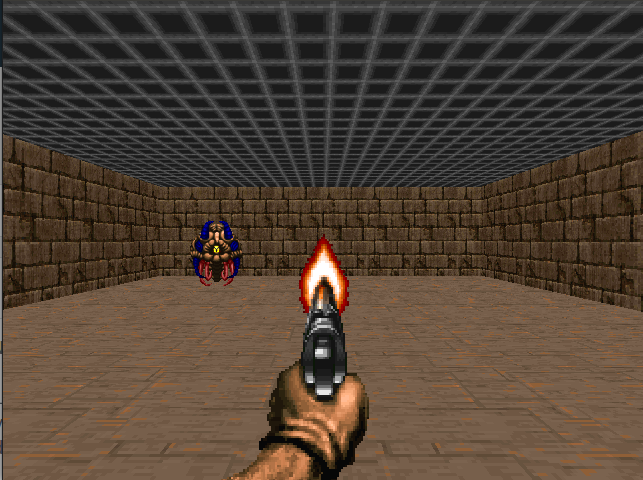
Doom 是一個擁有巨大狀態空間(數百萬種不同狀態)的大型環境。為該環境建立和更新 Q 表將效率低下。
這就是為什麼我們將在下一個單元中學習深度 Q-學習,這是一種演算法,**我們使用神經網路來近似給定狀態下每個動作的不同 Q 值。**

第三單元見!🔥