擴散模型課程文件
音訊擴散模型

並獲得增強的文件體驗
開始使用

音訊擴散模型
在本 notebook 中,我們將簡要了解如何使用擴散模型生成音訊。
你將會學到:
- 音訊在計算機中是如何表示的
- 在原始音訊資料和頻譜圖之間轉換的方法
- 如何使用自定義的 collate 函式準備一個 dataloader,將音訊切片轉換為頻譜圖
- 在特定音樂流派上微調現有的音訊擴散模型
- 將你的自定義 pipeline 上傳到 Hugging Face Hub
注意:這主要用於教育目的 - 不保證我們的模型聽起來會很好 😉。
讓我們開始吧!
設定和匯入
%pip install -q datasets diffusers torchaudio accelerate
import torch, random
import numpy as np
import torch.nn.functional as F
from tqdm.auto import tqdm
from IPython.display import Audio
from matplotlib import pyplot as plt
from diffusers import DiffusionPipeline
from torchaudio import transforms as AT
from torchvision import transforms as IT
從預訓練的音訊 Pipeline 中取樣
讓我們首先按照 Audio Diffusion 文件 來載入一個現有的音訊擴散模型 pipeline。
# Load a pre-trained audio diffusion pipeline
device = "mps" if torch.backends.mps.is_available() else "cuda" if torch.cuda.is_available() else "cpu"
pipe = DiffusionPipeline.from_pretrained("teticio/audio-diffusion-instrumental-hiphop-256").to(device)
就像我們在之前單元中使用的 pipeline 一樣,我們可以透過呼叫 pipeline 來建立樣本,如下所示:
>>> # Sample from the pipeline and display the outputs
>>> output = pipe()
>>> display(output.images[0])
>>> display(Audio(output.audios[0], rate=pipe.mel.get_sample_rate()))
在這裡,rate 引數指定了音訊的 取樣率;我們稍後會更深入地探討這一點。你還會注意到 pipeline 返回了多個東西。這是怎麼回事?讓我們仔細看看這兩個輸出。
第一個是資料陣列,代表生成的音訊
# The audio array
output.audios[0].shape
第二個看起來像一張灰度影像
# The output image (spectrogram)
output.images[0].size
這為我們揭示了這個 pipeline 是如何工作的。音訊不是直接透過擴散生成的——相反,這個 pipeline 擁有與我們在第一單元中看到的無條件影像生成 pipeline 相同的 2D UNet,它用於生成頻譜圖,然後經過後處理成為最終的音訊。
該 pipe 有一個額外的元件來處理這些轉換,我們可以透過 pipe.mel 訪問它。
pipe.mel
從音訊到影像,再回到音訊
音訊的“波形”編碼了隨時間變化的原始音訊樣本——例如,這可以是麥克風接收到的電訊號。處理這種“時域”表示可能很棘手,因此通常的做法是將其轉換為其他形式,通常是一種稱為頻譜圖的東西。頻譜圖顯示了不同頻率(y 軸)與時間(x 軸)的強度。
>>> # Calculate and show a spectrogram for our generated audio sample using torchaudio
>>> spec_transform = AT.Spectrogram(power=2)
>>> spectrogram = spec_transform(torch.tensor(output.audios[0]))
>>> print(spectrogram.min(), spectrogram.max())
>>> log_spectrogram = spectrogram.log()
>>> plt.imshow(log_spectrogram[0], cmap="gray")
tensor(0.) tensor(6.0842)
我們剛剛製作的頻譜圖的值在 0.0000000000001 到 1 之間,大部分值都接近這個範圍的低端。這對於視覺化或建模來說並不理想——事實上,我們必須對這些值取對數才能得到一個能顯示任何細節的灰度圖。因此,我們通常使用一種特殊的頻譜圖,稱為梅爾頻譜圖,它透過對訊號的不同頻率分量應用一些變換來捕捉對人類聽覺重要的資訊。
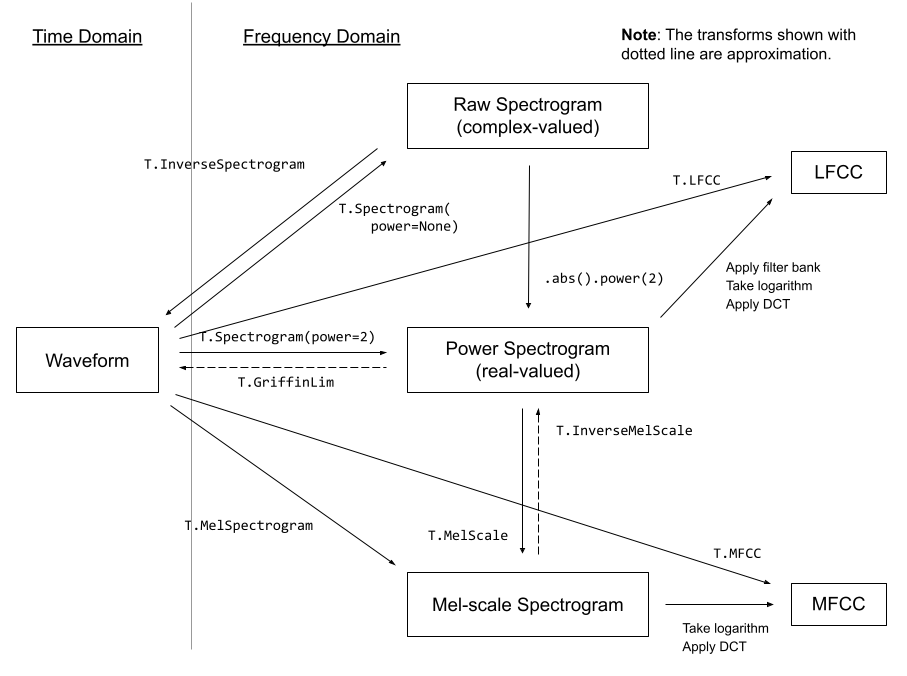 一些來自 torchaudio 文件的音訊變換
幸運的是,我們甚至不需要過多擔心這些變換——pipeline 的 mel 功能為我們處理了這些細節。利用這個功能,我們可以像這樣將頻譜圖影像轉換為音訊:
a = pipe.mel.image_to_audio(output.images[0])
a.shape
我們也可以透過首先載入原始音訊資料,然後呼叫 audio_slice_to_image() 函式,將音訊資料陣列轉換為頻譜圖影像。較長的音訊片段會自動被切成正確長度的塊,以生成 256x256 的頻譜圖影像。
>>> pipe.mel.load_audio(raw_audio=a)
>>> im = pipe.mel.audio_slice_to_image(0)
>>> im
音訊被表示為一個長長的數字陣列。要播放它,我們需要另一個關鍵資訊:取樣率。我們用多少個樣本(單個值)來表示一秒鐘的音訊?
我們可以透過以下方式檢視該 pipeline 訓練時使用的取樣率:
sample_rate_pipeline = pipe.mel.get_sample_rate()
sample_rate_pipeline
如果我們指定的取樣率不正確,我們會得到加速或減速的音訊。
display(Audio(output.audios[0], rate=44100)) # 2x speed微調 pipeline
現在我們對 pipeline 的工作原理有了大致的瞭解,讓我們在一些新的音訊資料上對其進行微調吧!
該資料集是不同流派音訊片段的集合,我們可以像這樣從 Hub 載入它:
from datasets import load_dataset

dataset = load_dataset("lewtun/music_genres", split="train")
dataset
你可以使用下面的程式碼來檢視資料集中的不同流派以及每個流派包含的樣本數量。
>>> for g in list(set(dataset["genre"])):
...     print(g, sum(x == g for x in dataset["genre"]))
Pop 945 Blues 58 Punk 2582 Old-Time / Historic 408 Experimental 1800 Folk 1214 Electronic 3071 Spoken 94 Classical 495 Country 142 Instrumental 1044 Chiptune / Glitch 1181 International 814 Ambient Electronic 796 Jazz 306 Soul-RnB 94 Hip-Hop 1757 Easy Listening 13 Rock 3095
資料集中的音訊以陣列形式存在。
>>> audio_array = dataset[0]["audio"]["array"]
>>> sample_rate_dataset = dataset[0]["audio"]["sampling_rate"]
>>> print("Audio array shape:", audio_array.shape)
>>> print("Sample rate:", sample_rate_dataset)
>>> display(Audio(audio_array, rate=sample_rate_dataset))
Audio array shape: (1323119,) Sample rate: 44100
請注意,此音訊的取樣率更高——如果我們想使用現有的 pipeline,我們需要對其進行“重取樣”以匹配。這些片段也比 pipeline 設定的要長。幸運的是,當我們使用 pipe.mel 載入音訊時,它會自動將片段切成更小的部分。
>>> a = dataset[0]["audio"]["array"]  # Get the audio array
>>> pipe.mel.load_audio(raw_audio=a)  # Load it with pipe.mel
>>> pipe.mel.audio_slice_to_image(0)  # View the first 'slice' as a spectrogram
我們需要記得調整取樣率,因為這個資料集的資料每秒的樣本數是原來的兩倍。
sample_rate_dataset = dataset[0]["audio"]["sampling_rate"]
sample_rate_dataset
這裡我們使用 torchaudio 的變換(匯入為 AT)進行重取樣,使用 pipe 的 mel 將音訊轉換為影像,並使用 torchvision 的變換(匯入為 IT)將影像轉換為張量。這樣我們就得到了一個函式,可以將音訊片段轉換為頻譜圖張量,用於訓練。
resampler = AT.Resample(sample_rate_dataset, sample_rate_pipeline, dtype=torch.float32)
to_t = IT.ToTensor()


def to_image(audio_array):
    audio_tensor = torch.tensor(audio_array).to(torch.float32)
    audio_tensor = resampler(audio_tensor)
    pipe.mel.load_audio(raw_audio=np.array(audio_tensor))
    num_slices = pipe.mel.get_number_of_slices()
    slice_idx = random.randint(0, num_slices - 1)  # Pic a random slice each time (excluding the last short slice)
    im = pipe.mel.audio_slice_to_image(slice_idx)
    return im
我們將使用我們的 to_image() 函式作為自定義 collate 函式的一部分,將我們的資料集轉換為可用於訓練的 dataloader。collate 函式定義瞭如何將一批來自資料集的樣本轉換為準備好用於訓練的最終資料批次。在這種情況下,我們將每個音訊樣本轉換為頻譜圖影像,並將結果張量堆疊在一起。
>>> def collate_fn(examples):
...     # to image -> to tensor -> rescale to (-1, 1) -> stack into batch
...     audio_ims = [to_t(to_image(x["audio"]["array"])) * 2 - 1 for x in examples]
...     return torch.stack(audio_ims)


>>> # Create a dataset with only the 'Chiptune / Glitch' genre of songs
>>> batch_size = 4  # 4 on colab, 12 on A100
>>> chosen_genre = "Electronic"  # <<< Try training on different genres <<<
>>> indexes = [i for i, g in enumerate(dataset["genre"]) if g == chosen_genre]
>>> filtered_dataset = dataset.select(indexes)
>>> dl = torch.utils.data.DataLoader(
...     filtered_dataset.shuffle(), batch_size=batch_size, collate_fn=collate_fn, shuffle=True
... )
>>> batch = next(iter(dl))
>>> print(batch.shape)
torch.Size([4, 1, 256, 256])
注意:除非你有足夠的 GPU VRAM,否則你需要使用較小的批次大小(例如 4)。
訓練迴圈
這是一個簡單的訓練迴圈,它在 dataloader 上執行幾個 epoch 來微調 pipeline 的 UNet。你也可以跳過這個單元格,並使用下一個單元格中的程式碼載入 pipeline。
epochs = 3
lr = 1e-4

pipe.unet.train()
pipe.scheduler.set_timesteps(1000)
optimizer = torch.optim.AdamW(pipe.unet.parameters(), lr=lr)

for epoch in range(epochs):
    for step, batch in tqdm(enumerate(dl), total=len(dl)):

        # Prepare the input images
        clean_images = batch.to(device)
        bs = clean_images.shape[0]

        # Sample a random timestep for each image
        timesteps = torch.randint(0, pipe.scheduler.num_train_timesteps, (bs,), device=clean_images.device).long()

        # Add noise to the clean images according to the noise magnitude at each timestep
        noise = torch.randn(clean_images.shape).to(clean_images.device)
        noisy_images = pipe.scheduler.add_noise(clean_images, noise, timesteps)

        # Get the model prediction
        noise_pred = pipe.unet(noisy_images, timesteps, return_dict=False)[0]

        # Calculate the loss
        loss = F.mse_loss(noise_pred, noise)
        loss.backward(loss)

        # Update the model parameters with the optimizer
        optimizer.step()
optimizer.zero_grad()# OR: Load the version I trained earlier
pipe = DiffusionPipeline.from_pretrained("johnowhitaker/Electronic_test").to(device)>>> output = pipe()
>>> display(output.images[0])
>>> display(Audio(output.audios[0], rate=22050))
>>> # Make a longer sample by passing in a starting noise tensor with a different shape
>>> noise = torch.randn(1, 1, pipe.unet.sample_size[0], pipe.unet.sample_size[1] * 4).to(device)
>>> output = pipe(noise=noise)
>>> display(output.images[0])
>>> display(Audio(output.audios[0], rate=22050))
輸出的聲音不是最驚豔的,但這只是一個開始 :) 嘗試調整學習率和 epoch 數量,並在 Discord 上分享你的最佳結果,以便我們一起改進!
一些需要考慮的事情
- 我們正在處理 256 畫素的正方形頻譜圖影像,這限制了我們的批次大小。你能從 128x128 的頻譜圖中恢復出足夠質量的音訊嗎?
- 我們每次都選擇音訊片段的不同切片來代替隨機影像增強,但是在訓練多個 epoch 時,是否可以透過一些不同型別的增強來改進這一點?
- 我們還能如何利用它來生成更長的片段?也許你可以生成一個 5 秒的起始片段,然後使用受 inpainting 啟發的想法繼續生成接續初始片段的音訊段……
- 在這個頻譜圖擴散的背景下,什麼是與影像到影像等價的操作?
推送到 Hub
一旦你對你的模型滿意,你可以儲存它並將其推送到 Hub,供他人享用。
from huggingface_hub import get_full_repo_name, HfApi, create_repo, ModelCard# Pick a name for the model
model_name = "audio-diffusion-electronic"
hub_model_id = get_full_repo_name(model_name)# Save the pipeline locally
pipe.save_pretrained(model_name)>>> # Inspect the folder contents
>>> !ls {model_name}mel model_index.json scheduler unet
# Create a repository
create_repo(hub_model_id)# Upload the files
api = HfApi()
api.upload_folder(folder_path=f"{model_name}/scheduler", path_in_repo="scheduler", repo_id=hub_model_id)
api.upload_folder(folder_path=f"{model_name}/mel", path_in_repo="mel", repo_id=hub_model_id)
api.upload_folder(folder_path=f"{model_name}/unet", path_in_repo="unet", repo_id=hub_model_id)
api.upload_file(
path_or_fileobj=f"{model_name}/model_index.json",
path_in_repo="model_index.json",
repo_id=hub_model_id,
)# Push a model card
content = f"""
---
license: mit
tags:
- pytorch
- diffusers
- unconditional-audio-generation
- diffusion-models-class
---
# Model Card for Unit 4 of the [Diffusion Models Class 🧨](https://github.com/huggingface/diffusion-models-class)
This model is a diffusion model for unconditional audio generation of music in the genre {chosen_genre}
## Usage
<pre>
from IPython.display import Audio
from diffusers import DiffusionPipeline
pipe = DiffusionPipeline.from_pretrained("{hub_model_id}")
output = pipe()
display(output.images[0])
display(Audio(output.audios[0], rate=pipe.mel.get_sample_rate()))
</pre>
"""
card = ModelCard(content)
card.push_to_hub(hub_model_id)結論
希望這個 notebook 能讓你初步體驗到音訊生成的潛力。檢視本單元引言中連結的一些參考文獻,瞭解一些更高階的方法以及它們可以創造出的驚人樣本!
< > 在 GitHub 上更新