AutoTrain 文件
使用 AutoTrain 進行抽取式問答

並獲得增強的文件體驗
開始使用
使用 AutoTrain 進行抽取式問答
抽取式問答(QA)使人工智慧模型能夠從文字段落中查詢並提取精確的答案。本指南將向您展示如何使用 AutoTrain 訓練自定義的問答模型,支援像 BERT、RoBERTa 和 DeBERTa 這樣的流行架構。
什麼是抽取式問答?
抽取式問答模型學習
- 在較長的文字段落中定位確切的答案範圍
- 理解問題並將其與相關上下文匹配
- 提取精確答案而不是生成答案
- 處理關於文字的簡單和複雜查詢
準備您的資料
您的資料集需要以下基本列
text: 包含潛在答案的段落(也稱為上下文)question: 您想回答的查詢answer: 答案範圍資訊,包括文字和位置
以下是您的資料集應有的示例
{"context":"Architecturally, the school has a Catholic character. Atop the Main Building's gold dome is a golden statue of the Virgin Mary. Immediately in front of the Main Building and facing it, is a copper statue of Christ with arms upraised with the legend \"Venite Ad Me Omnes\". Next to the Main Building is the Basilica of the Sacred Heart. Immediately behind the basilica is the Grotto, a Marian place of prayer and reflection. It is a replica of the grotto at Lourdes, France where the Virgin Mary reputedly appeared to Saint Bernadette Soubirous in 1858. At the end of the main drive (and in a direct line that connects through 3 statues and the Gold Dome), is a simple, modern stone statue of Mary.","question":"To whom did the Virgin Mary allegedly appear in 1858 in Lourdes France?","answers":{"text":["Saint Bernadette Soubirous"],"answer_start":[515]}}
{"context":"Architecturally, the school has a Catholic character. Atop the Main Building's gold dome is a golden statue of the Virgin Mary. Immediately in front of the Main Building and facing it, is a copper statue of Christ with arms upraised with the legend \"Venite Ad Me Omnes\". Next to the Main Building is the Basilica of the Sacred Heart. Immediately behind the basilica is the Grotto, a Marian place of prayer and reflection. It is a replica of the grotto at Lourdes, France where the Virgin Mary reputedly appeared to Saint Bernadette Soubirous in 1858. At the end of the main drive (and in a direct line that connects through 3 statues and the Gold Dome), is a simple, modern stone statue of Mary.","question":"What is in front of the Notre Dame Main Building?","answers":{"text":["a copper statue of Christ"],"answer_start":[188]}}
{"context":"Architecturally, the school has a Catholic character. Atop the Main Building's gold dome is a golden statue of the Virgin Mary. Immediately in front of the Main Building and facing it, is a copper statue of Christ with arms upraised with the legend \"Venite Ad Me Omnes\". Next to the Main Building is the Basilica of the Sacred Heart. Immediately behind the basilica is the Grotto, a Marian place of prayer and reflection. It is a replica of the grotto at Lourdes, France where the Virgin Mary reputedly appeared to Saint Bernadette Soubirous in 1858. At the end of the main drive (and in a direct line that connects through 3 statues and the Gold Dome), is a simple, modern stone statue of Mary.","question":"The Basilica of the Sacred heart at Notre Dame is beside to which structure?","answers":{"text":["the Main Building"],"answer_start":[279]}}
注意:問答任務的首選格式是 JSONL,如果您想使用 CSV,answer 列應為包含 text 和 answer_start 鍵的字串化 JSON。
Hugging Face Hub 上的示例資料集:lhoestq/squad
附註:您可以使用 squad 和 squad v2 兩種資料格式,只要正確進行列對映即可。
訓練選項
本地訓練
在您自己的硬體上訓練模型,完全控制整個過程。
要在本地訓練一個抽取式問答模型,您需要一個配置檔案
task: extractive-qa
base_model: google-bert/bert-base-uncased
project_name: autotrain-bert-ex-qa1
log: tensorboard
backend: local

data:
  path: lhoestq/squad
  train_split: train
  valid_split: validation
  column_mapping:
    text_column: context
    question_column: question
    answer_column: answers

params:
  max_seq_length: 512
  max_doc_stride: 128
  epochs: 3
  batch_size: 4
  lr: 2e-5
  optimizer: adamw_torch
  scheduler: linear
  gradient_accumulation: 1
  mixed_precision: fp16

hub:
  username: ${HF_USERNAME}
  token: ${HF_TOKEN}
  push_to_hub: true
要訓練模型,請執行以下命令
$ autotrain --config config.yaml
在這裡,我們正在 SQuAD 資料集上使用抽取式問答任務訓練一個 BERT 模型。該模型訓練 3 個 epoch,批大小為 4,學習率為 2e-5。訓練過程使用 TensorBoard 進行日誌記錄。模型在本地訓練,並在訓練後推送到 Hugging Face Hub。
在 Hugging Face 上進行雲訓練
使用 Hugging Face 的雲基礎設施訓練模型,以獲得更好的可擴充套件性。
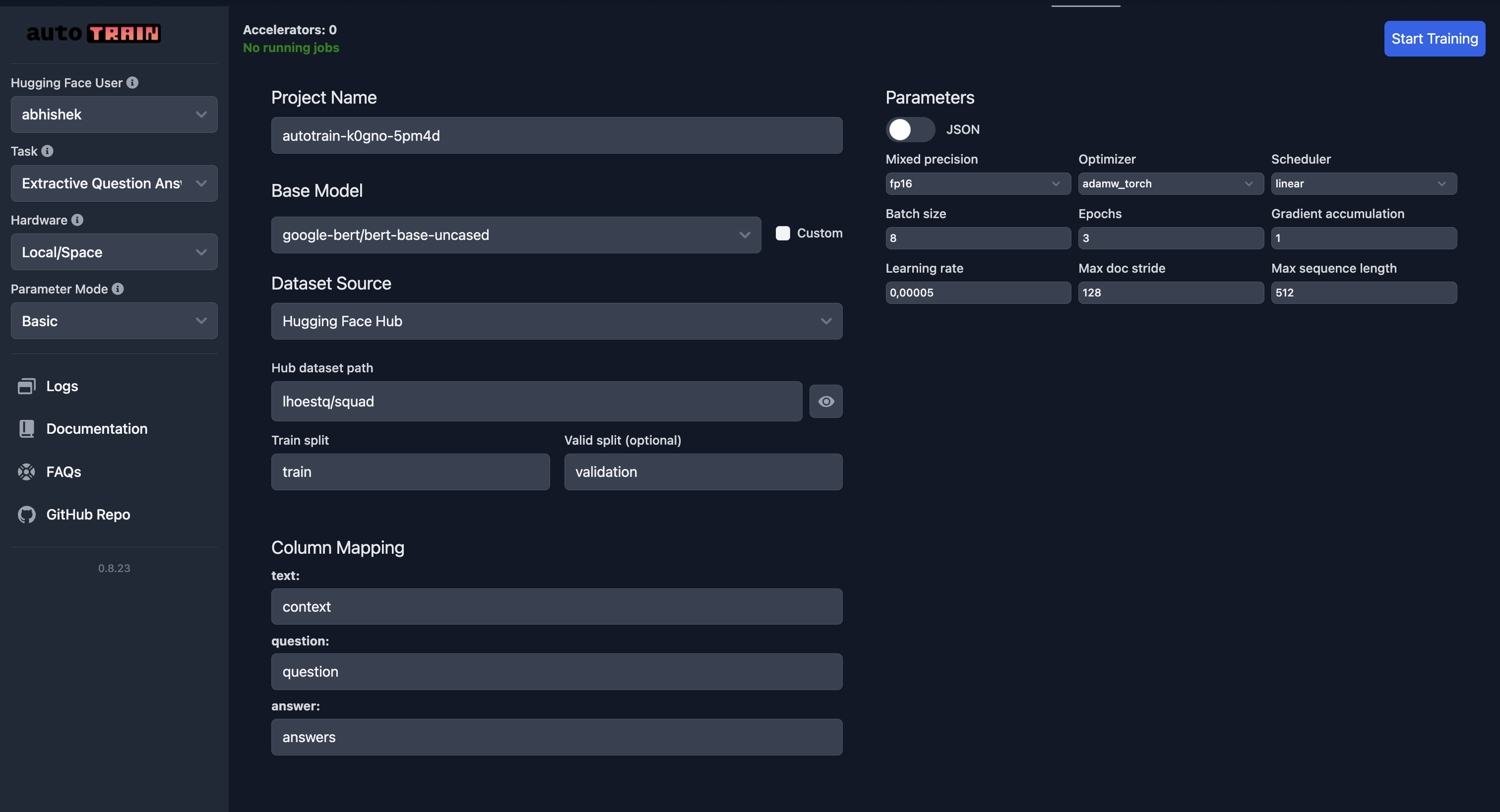
和往常一樣,請特別注意列對映。
引數參考
class autotrain.trainers.extractive_question_answering.params.ExtractiveQuestionAnsweringParams
< 來源 >( data_path: str = None model: str = 'bert-base-uncased' lr: float = 5e-05 epochs: int = 3 max_seq_length: int = 128 max_doc_stride: int = 128 batch_size: int = 8 warmup_ratio: float = 0.1 gradient_accumulation: int = 1 optimizer: str = 'adamw_torch' scheduler: str = 'linear' weight_decay: float = 0.0 max_grad_norm: float = 1.0 seed: int = 42 train_split: str = 'train' valid_split: typing.Optional[str] = None text_column: str = 'context' question_column: str = 'question' answer_column: str = 'answers' logging_steps: int = -1 project_name: str = 'project-name' auto_find_batch_size: bool = False mixed_precision: typing.Optional[str] = None save_total_limit: int = 1 token: typing.Optional[str] = None push_to_hub: bool = False eval_strategy: str = 'epoch' username: typing.Optional[str] = None log: str = 'none' early_stopping_patience: int = 5 early_stopping_threshold: float = 0.01 )
引數
- data_path (str) — 資料集路徑。
- model (str) — 預訓練模型名稱。預設為 “bert-base-uncased”。
- lr (float) — 最佳化器的學習率。預設為 5e-5。
- epochs (int) — 訓練的 epoch 數。預設為 3。
- max_seq_length (int) — 輸入的最大序列長度。預設為 128。
- max_doc_stride (int) — 用於拆分上下文的最大文件步幅。預設為 128。
- batch_size (int) — 訓練的批大小。預設為 8。
- warmup_ratio (float) — 學習率排程器的預熱比例。預設為 0.1。
- gradient_accumulation (int) — 梯度累積步數。預設為 1。
- optimizer (str) — 最佳化器型別。預設為 “adamw_torch”。
- scheduler (str) — 學習率排程器型別。預設為 “linear”。
- weight_decay (float) — 最佳化器的權重衰減。預設為 0.0。
- max_grad_norm (float) — 用於裁剪的最大梯度範數。預設為 1.0。
- seed (int) — 用於可復現性的隨機種子。預設為 42。
- train_split (str) — 訓練資料分割的名稱。預設為 “train”。
- valid_split (Optional[str]) — 驗證資料分割的名稱。預設為 None。
- text_column (str) — 上下文/文字的列名。預設為 “context”。
- question_column (str) — 問題的列名。預設為 “question”。
- answer_column (str) — 答案的列名。預設為 “answers”。
- logging_steps (int) — 兩次日誌記錄之間的步數。預設為 -1。
- project_name (str) — 用於輸出目錄的專案名稱。預設為 “project-name”。
- auto_find_batch_size (bool) — 自動尋找最佳批大小。預設為 False。
- mixed_precision (Optional[str]) — 混合精度訓練模式 (fp16, bf16 或 None)。預設為 None。
- save_total_limit (int) — 要儲存的最大檢查點數量。預設為 1。
- token (Optional[str]) — 用於 Hugging Face Hub 的身份驗證令牌。預設為 None。
- push_to_hub (bool) — 是否將模型推送到 Hugging Face Hub。預設為 False。
- eval_strategy (str) — 訓練期間的評估策略。預設為 “epoch”。
- username (Optional[str]) — 用於身份驗證的 Hugging Face 使用者名稱。預設為 None。
- log (str) — 用於實驗跟蹤的日誌記錄方法。預設為 “none”。
- early_stopping_patience (int) — 提前停止前無改進的 epoch 數。預設為 5。
- early_stopping_threshold (float) — 提前停止改進的閾值。預設為 0.01。
ExtractiveQuestionAnsweringParams