AutoTrain 文件
使用 AutoTrain Advanced 微調大語言模型

並獲得增強的文件體驗
開始使用
使用 AutoTrain Advanced 微調大語言模型
AutoTrain Advanced 可以讓您輕鬆地為特定用例微調大語言模型 (LLM)。本指南涵蓋了您需要了解的有關大語言模型微調的所有內容。
主要功能
- 使用 CSV 和 JSONL 格式進行簡單的資料準備
- 支援多種訓練方法 (SFT, DPO, ORPO)
- 內建聊天模板
- 本地和雲端訓練選項
- 最佳化的訓練引數
支援的訓練方法
AutoTrain 支援多種專門的訓練器
llm:通用 LLM 訓練器llm-sft:監督微調 (Supervised Fine-Tuning) 訓練器llm-reward:獎勵建模 (Reward modeling) 訓練器llm-dpo:直接偏好最佳化 (Direct Preference Optimization) 訓練器llm-orpo:ORPO (Optimal Reward Policy Optimization) 訓練器
資料準備
LLM 微調接受 CSV 和 JSONL 格式的資料。JSONL 是首選格式。資料的格式化方式取決於您訓練 LLM 的任務。
經典文字生成
對於文字生成,資料應採用以下格式:
| text |
|---|
| wikipedia is a free online encyclopedia |
| it is a collaborative project |
| that anyone can edit |
| wikipedia is the largest and most popular general reference work on the internet |
此格式的示例資料集可以在這裡找到:stas/openwebtext-10k
示例任務
- 文字生成
- 程式碼補全
相容的訓練器
- SFT Trainer
- Generic Trainer (通用訓練器)
聊天機器人 / 問答 / 程式碼生成 / 函式呼叫
對於此任務,您可以使用 CSV 或 JSONL 資料。如果您自己格式化資料(新增開始、結束標記等),可以使用 CSV 或 JSONL 格式。如果您不想自己格式化資料,而是希望使用 --chat-template 引數為您格式化資料,則必須使用 JSONL 格式。在這兩種情況下,CSV 和 JSONL 可以互換使用,但 JSONL 是最首選的格式。
要訓練聊天機器人,您的資料需要有 content 和 role。一些模型還支援 system 角色。
這是一個聊天機器人資料集的示例(單個樣本):
[{'content': 'Help write a letter of 100 -200 words to my future self for '
             'Kyra, reflecting on her goals and aspirations.',
  'role': 'user'},
 {'content': 'Dear Future Self,\n'
             '\n'
             "I hope you're happy and proud of what you've achieved. As I "
             "write this, I'm excited to think about our goals and how far "
             "you've come. One goal was to be a machine learning engineer. I "
             "hope you've worked hard and become skilled in this field. Keep "
             'learning and innovating. Traveling was important to us. I hope '
             "you've seen different places and enjoyed the beauty of our "
             'world. Remember the memories and lessons. Starting a family '
             'mattered to us. If you have kids, treasure every moment. Be '
             'patient, loving, and grateful for your family.\n'
             '\n'
             'Take care of yourself. Rest, reflect, and cherish the time you '
             'spend with loved ones. Remember your dreams and celebrate what '
             "you've achieved. Your determination brought you here. I'm "
             "excited to see the person you've become, the impact you've made, "
             'and the love and joy in your life. Embrace opportunities and '
             'keep dreaming big.\n'
             '\n'
             'With love,\n'
             'Kyra',
  'role': 'assistant'}]
如您所見,資料有 content 和 role 列。role 列可以是 user、assistant 或 system。然而,這些資料尚未為訓練進行格式化。您可以在訓練期間使用 --chat-template 引數來格式化資料。
--chat-template 支援以下幾種模板:
none(預設)zephyrchatmltokenizer:使用 tokenizer 配置檔案中提到的聊天模板
下面還展示了一個多行樣本:
[{"content": "hello", "role": "user"}, {"content": "hi nice to meet you", "role": "assistant"}]
[{"content": "how are you", "role": "user"}, {"content": "I am fine", "role": "assistant"}]
[{"content": "What is your name?", "role": "user"}, {"content": "My name is Mary", "role": "assistant"}]
[{"content": "Which is the best programming language?", "role": "user"}, {"content": "Python", "role": "assistant"}]
.
.
.此格式的示例資料集可以在這裡找到:HuggingFaceH4/no_robots
如果您不想使用 --chat-template 格式化資料,可以自行格式化資料並使用以下格式:
<|begin_of_text|><|start_header_id|>system<|end_header_id|>\n\nCutting Knowledge Date: December 2023\nToday Date: 03 Oct 2024\n\n<|eot_id|><|start_header_id|>user<|end_header_id|>\n\nHelp write a letter of 100 -200 words to my future self for Kyra, reflecting on her goals and aspirations.<|eot_id|><|start_header_id|>assistant<|end_header_id|>\n\nDear Future Self,\n\nI hope you're happy and proud of what you've achieved. As I write this, I'm excited to think about our goals and how far you've come. One goal was to be a machine learning engineer. I hope you've worked hard and become skilled in this field. Keep learning and innovating. Traveling was important to us. I hope you've seen different places and enjoyed the beauty of our world. Remember the memories and lessons. Starting a family mattered to us. If you have kids, treasure every moment. Be patient, loving, and grateful for your family.\n\nTake care of yourself. Rest, reflect, and cherish the time you spend with loved ones. Remember your dreams and celebrate what you've achieved. Your determination brought you here. I'm excited to see the person you've become, the impact you've made, and the love and joy in your life. Embrace opportunities and keep dreaming big.\n\nWith love,\nKyra<|eot_id|>下面展示了一個多行資料集的樣本:
[{"text": "<|begin_of_text|><|start_header_id|>system<|end_header_id|>\n\nCutting Knowledge Date: December 2023\nToday Date: 03 Oct 2024\n\n<|eot_id|><|start_header_id|>user<|end_header_id|>\n\nhello<|eot_id|><|start_header_id|>assistant<|end_header_id|>\n\nhi nice to meet you<|eot_id|>"}]
[{"text": "<|begin_of_text|><|start_header_id|>system<|end_header_id|>\n\nCutting Knowledge Date: December 2023\nToday Date: 03 Oct 2024\n\n<|eot_id|><|start_header_id|>user<|end_header_id|>\n\nhow are you<|eot_id|><|start_header_id|>assistant<|end_header_id|>\n\nI am fine<|eot_id|>"}]
[{"text": "<|begin_of_text|><|start_header_id|>system<|end_header_id|>\n\nCutting Knowledge Date: December 2023\nToday Date: 03 Oct 2024\n\n<|eot_id|><|start_header_id|>user<|end_header_id|>\n\nWhat is your name?<|eot_id|><|start_header_id|>assistant<|end_header_id|>\n\nMy name is Mary<|eot_id|>"}]
[{"text": "<|begin_of_text|><|start_header_id|>system<|end_header_id|>\n\nCutting Knowledge Date: December 2023\nToday Date: 03 Oct 2024\n\n<|eot_id|><|start_header_id|>user<|end_header_id|>\n\nWhich is the best programming language?<|eot_id|><|start_header_id|>assistant<|end_header_id|>\n\nPython<|eot_id|>"}]
.
.
.此格式的示例資料集可以在這裡找到:timdettmers/openassistant-guanaco
在上面的示例中,我們只看到了兩輪對話:一輪來自使用者,一輪來自助手。但是,您可以在單個樣本中包含來自使用者和助手的多輪對話。
聊天模型可以使用以下訓練器進行訓練:
SFT Trainer
- 僅需要
text列 - 示例資料集:HuggingFaceH4/no_robots
- 僅需要
Generic Trainer (通用訓練器)
- 僅需要
text列 - 示例資料集:HuggingFaceH4/no_robots
- 僅需要
Reward Trainer (獎勵訓練器)
- 需要
text和rejected_text列 - 示例資料集:trl-lib/ultrafeedback_binarized
- 需要
DPO Trainer
- 需要
prompt、text和rejected_text列 - 示例資料集:trl-lib/ultrafeedback_binarized
- 需要
ORPO Trainer
- 需要
prompt、text和rejected_text列 - 示例資料集:trl-lib/ultrafeedback_binarized
- 需要
獎勵訓練器和 DPO/ORPO 訓練器的資料格式之間的唯一區別是,獎勵訓練器只需要 text 和 rejected_text 列,而 DPO/ORPO 訓練器需要額外的 prompt 列。
LLM 微調的最佳實踐
記憶體最佳化
- 為您的硬體使用適當的
block_size和model_max_length - 在可能的情況下啟用混合精度訓練
- 對大型模型使用 PEFT 技術
資料質量
- 清理並驗證您的訓練資料
- 確保對話樣本均衡
- 使用適當的聊天模板
訓練技巧
- 從較小的學習率開始
- 使用 tensorboard 監控訓練指標
- 在訓練過程中驗證模型輸出
相關資源
訓練
本地訓練
在本地,可以使用 autotrain --config config.yaml 命令進行訓練。config.yaml 檔案應包含以下引數:
task: llm-orpo
base_model: meta-llama/Meta-Llama-3-8B-Instruct
project_name: autotrain-llama3-8b-orpo
log: tensorboard
backend: local

data:
  path: argilla/distilabel-capybara-dpo-7k-binarized
  train_split: train
  valid_split: null
  chat_template: chatml
  column_mapping:
    text_column: chosen
    rejected_text_column: rejected
    prompt_text_column: prompt

params:
  block_size: 1024
  model_max_length: 8192
  max_prompt_length: 512
  epochs: 3
  batch_size: 2
  lr: 3e-5
  peft: true
  quantization: int4
  target_modules: all-linear
  padding: right
  optimizer: adamw_torch
  scheduler: linear
  gradient_accumulation: 4
  mixed_precision: fp16

hub:
  username: ${HF_USERNAME}
  token: ${HF_TOKEN}
  push_to_hub: true
在上述配置檔案中,我們正在使用 ORPO 訓練器訓練一個模型。該模型基於 meta-llama/Meta-Llama-3-8B-Instruct 模型進行訓練。資料是 argilla/distilabel-capybara-dpo-7k-binarized 資料集。chat_template 引數設定為 chatml。column_mapping 引數用於將資料集中的列對映到 ORPO 訓練器所需的列。params 部分包含訓練引數,如 block_size、model_max_length、epochs、batch_size、lr、peft、quantization、target_modules、padding、optimizer、scheduler、gradient_accumulation 和 mixed_precision。hub 部分包含 Hugging Face 賬戶的使用者名稱和 token,並且 push_to_hub 引數設定為 true,以將訓練好的模型推送到 Hugging Face Hub。
如果您在本地有訓練檔案,可以將資料部分更改為:
data:
  path: path/to/training/file
  train_split: train # name of the training file
  valid_split: null
  chat_template: chatml
  column_mapping:
    text_column: chosen
    rejected_text_column: rejected
    prompt_text_column: prompt
以上假設您在 path/to/training/file 目錄中有 train.csv 或 train.jsonl 檔案,並且您將對資料應用 chatml 模板。
您可以使用以下命令執行訓練:
$ autotrain --config config.yaml
更多用於微調不同型別 LLM 和不同任務的示例配置檔案可以在這裡找到。
在 Hugging Face Spaces 中訓練
如果您在 Hugging Face Spaces 中進行訓練,一切都與本地訓練相同。
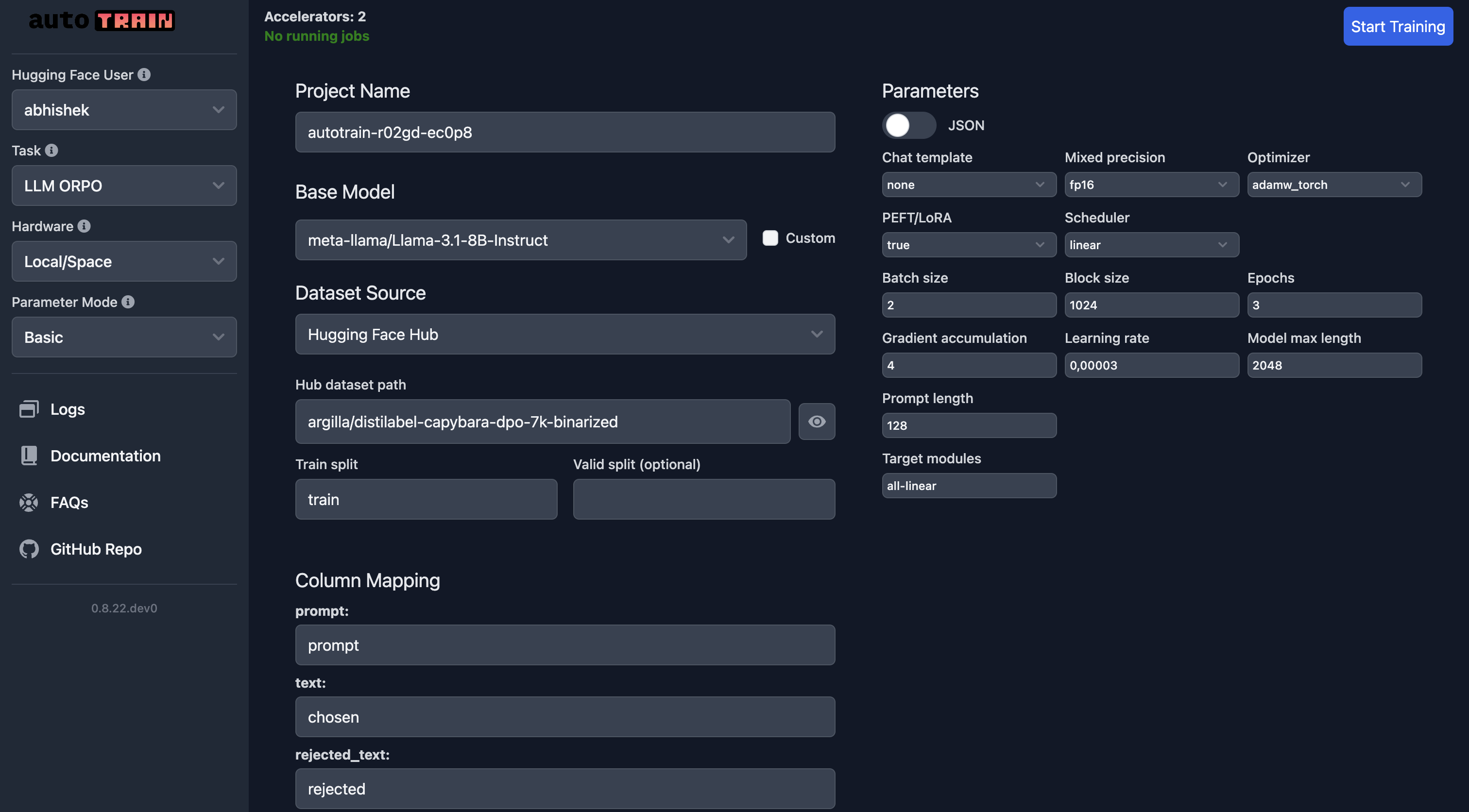
在 UI 中,您需要確保選擇了正確的模型、資料集和資料分割。應特別注意 column_mapping。
一旦您對引數感到滿意,可以點選 Start Training 按鈕開始訓練過程。
引數
LLM 微調引數
class autotrain.trainers.clm.params.LLMTrainingParams
< 原始碼 >( model: str = 'gpt2' project_name: str = 'project-name' data_path: str = 'data' train_split: str = 'train' valid_split: typing.Optional[str] = None add_eos_token: bool = True block_size: typing.Union[int, typing.List[int]] = -1 model_max_length: int = 2048 padding: typing.Optional[str] = 'right' trainer: str = 'default' use_flash_attention_2: bool = False log: str = 'none' disable_gradient_checkpointing: bool = False logging_steps: int = -1 eval_strategy: str = 'epoch' save_total_limit: int = 1 auto_find_batch_size: bool = False mixed_precision: typing.Optional[str] = None lr: float = 3e-05 epochs: int = 1 batch_size: int = 2 warmup_ratio: float = 0.1 gradient_accumulation: int = 4 optimizer: str = 'adamw_torch' scheduler: str = 'linear' weight_decay: float = 0.0 max_grad_norm: float = 1.0 seed: int = 42 chat_template: typing.Optional[str] = None quantization: typing.Optional[str] = 'int4' target_modules: typing.Optional[str] = 'all-linear' merge_adapter: bool = False peft: bool = False lora_r: int = 16 lora_alpha: int = 32 lora_dropout: float = 0.05 model_ref: typing.Optional[str] = None dpo_beta: float = 0.1 max_prompt_length: int = 128 max_completion_length: typing.Optional[int] = None prompt_text_column: typing.Optional[str] = None text_column: str = 'text' rejected_text_column: typing.Optional[str] = None push_to_hub: bool = False username: typing.Optional[str] = None token: typing.Optional[str] = None unsloth: bool = False distributed_backend: typing.Optional[str] = None )
引數
- model (str) — 用於訓練的模型名稱。預設為 “gpt2”。
- project_name (str) — 專案名稱和輸出目錄。預設為 “project-name”。
- data_path (str) — 資料集的路徑。預設為 “data”。
- train_split (str) — 訓練資料分割的配置。預設為 “train”。
- valid_split (Optional[str]) — 驗證資料分割的配置。預設為 None。
- add_eos_token (bool) — 是否在序列末尾新增 EOS 標記。預設為 True。
- block_size (Union[int, List[int]]) — 用於訓練的塊大小,可以是一個整數或一個整數列表。預設為 -1。
- model_max_length (int) — 模型輸入的最大長度。預設為 2048。
- padding (Optional[str]) — 填充序列的一側(左側或右側)。預設為 “right”。
- trainer (str) — 要使用的訓練器型別。預設為 “default”。
- use_flash_attention_2 (bool) — 是否使用 Flash Attention 第 2 版。預設為 False。
- log (str) — 用於實驗跟蹤的日誌記錄方法。預設為 “none”。
- disable_gradient_checkpointing (bool) — 是否停用梯度檢查點。預設為 False。
- logging_steps (int) — 日誌記錄事件之間的步數。預設為 -1。
- eval_strategy (str) — 評估策略(例如,‘epoch’)。預設為 “epoch”。
- save_total_limit (int) — 要保留的最大檢查點數量。預設為 1。
- auto_find_batch_size (bool) — 是否自動尋找最佳批次大小。預設為 False。
- mixed_precision (Optional[str]) — 要使用的混合精度型別(例如,‘fp16’、‘bf16’ 或 None)。預設為 None。
- lr (float) — 訓練的學習率。預設為 3e-5。
- epochs (int) — 訓練輪數。預設為 1。
- batch_size (int) — 訓練的批次大小。預設為 2。
- warmup_ratio (float) — 用於學習率預熱的訓練比例。預設為 0.1。
- gradient_accumulation (int) — 在更新前累積梯度的步數。預設為 4。
- optimizer (str) — 用於訓練的最佳化器。預設為 “adamw_torch”。
- scheduler (str) — 要使用的學習率排程器。預設為 “linear”。
- weight_decay (float) — 應用於最佳化器的權重衰減。預設為 0.0。
- max_grad_norm (float) — 用於梯度裁剪的最大範數。預設為 1.0。
- seed (int) — 用於可復現性的隨機種子。預設為 42。
- chat_template (Optional[str]) — 用於基於聊天模型的模板,選項包括:None、zephyr、chatml 或 tokenizer。預設為 None。
- quantization (Optional[str]) — 要使用的量化方法(例如 ‘int4’、‘int8’ 或 None)。預設為 “int4”。
- target_modules (Optional[str]) — 用於量化或微調的目標模組。預設為 “all-linear”。
- merge_adapter (bool) — 是否合併介面卡層。預設為 False。
- peft (bool) — 是否使用引數高效微調 (PEFT)。預設為 False。
- lora_r (int) — LoRA 矩陣的秩。預設為 16。
- lora_alpha (int) — LoRA 的 Alpha 引數。預設為 32。
- lora_dropout (float) — LoRA 的丟棄率。預設為 0.05。
- model_ref (Optional[str]) — DPO 訓練器的參考模型。預設為 None。
- dpo_beta (float) — DPO 訓練器的 Beta 引數。預設為 0.1。
- max_prompt_length (int) — 提示的最大長度。預設為 128。
- max_completion_length (Optional[int]) — 補全的最大長度。預設為 None。
- prompt_text_column (Optional[str]) — 提示文字的列名。預設為 None。
- text_column (str) — 文字資料的列名。預設為 “text”。
- rejected_text_column (Optional[str]) — 拒絕文字資料的列名。預設為 None。
- push_to_hub (bool) — 是否將模型推送到 Hugging Face Hub。預設為 False。
- username (Optional[str]) — 用於身份驗證的 Hugging Face 使用者名稱。預設為 None。
- token (Optional[str]) — 用於身份驗證的 Hugging Face 令牌。預設為 None。
- unsloth (bool) — 是否使用 unsloth 庫。預設為 False。
- distributed_backend (Optional[str]) — 用於分散式訓練的後端。預設為 None。
LLMTrainingParams:使用 autotrain 庫訓練語言模型的引數。
任務特定引數
不同訓練器使用的長度引數可能不同。有些比其他的需要更多的上下文。
- block_size:這是最大序列長度或一個文字塊的長度。設定為 -1 可自動確定塊大小。預設為 -1。
- model_max_length:設定模型在單個批次中處理的最大長度,這會影響效能和記憶體使用。預設為 1024
- max_prompt_length:指定訓練中使用的提示的最大長度,這對於需要初始上下文輸入的任務尤為重要。僅用於
orpo和dpo訓練器。 - max_completion_length:要使用的補全長度,對於 orpo:僅限編碼器-解碼器模型。對於 dpo,它是補全文字的長度。
注意:
- 塊大小不能大於 model_max_length!
- max_prompt_length 不能大於 model_max_length!
- max_prompt_length 不能大於 block_size!
- max_completion_length 不能大於 model_max_length!
- max_completion_length 不能大於 block_size!
注意:不遵守這些限制將導致錯誤或 nan 損失。
通用訓練器
--add_eos_token, --add-eos-token
                    Toggle whether to automatically add an End Of Sentence (EOS) token at the end of texts, which can be critical for certain
                    types of models like language models. Only used for `default` trainer
--block_size BLOCK_SIZE, --block-size BLOCK_SIZE
                    Specify the block size for processing sequences. This is maximum sequence length or length of one block of text. Setting to
                    -1 determines block size automatically. Default is -1.
--model_max_length MODEL_MAX_LENGTH, --model-max-length MODEL_MAX_LENGTH
                    Set the maximum length for the model to process in a single batch, which can affect both performance and memory usage.
                    Default is 1024
SFT 訓練器
--block_size BLOCK_SIZE, --block-size BLOCK_SIZE
                    Specify the block size for processing sequences. This is maximum sequence length or length of one block of text. Setting to
                    -1 determines block size automatically. Default is -1.
--model_max_length MODEL_MAX_LENGTH, --model-max-length MODEL_MAX_LENGTH
                    Set the maximum length for the model to process in a single batch, which can affect both performance and memory usage.
                    Default is 1024
獎勵訓練器
--block_size BLOCK_SIZE, --block-size BLOCK_SIZE
                    Specify the block size for processing sequences. This is maximum sequence length or length of one block of text. Setting to
                    -1 determines block size automatically. Default is -1.
--model_max_length MODEL_MAX_LENGTH, --model-max-length MODEL_MAX_LENGTH
                    Set the maximum length for the model to process in a single batch, which can affect both performance and memory usage.
                    Default is 1024
DPO 訓練器
--dpo-beta DPO_BETA, --dpo-beta DPO_BETA
                    Beta for DPO trainer

--model-ref MODEL_REF
                    Reference model to use for DPO when not using PEFT
--block_size BLOCK_SIZE, --block-size BLOCK_SIZE
                    Specify the block size for processing sequences. This is maximum sequence length or length of one block of text. Setting to
                    -1 determines block size automatically. Default is -1.
--model_max_length MODEL_MAX_LENGTH, --model-max-length MODEL_MAX_LENGTH
                    Set the maximum length for the model to process in a single batch, which can affect both performance and memory usage.
                    Default is 1024
--max_prompt_length MAX_PROMPT_LENGTH, --max-prompt-length MAX_PROMPT_LENGTH
                    Specify the maximum length for prompts used in training, particularly relevant for tasks requiring initial contextual input.
                    Used only for `orpo` trainer.
--max_completion_length MAX_COMPLETION_LENGTH, --max-completion-length MAX_COMPLETION_LENGTH
                    Completion length to use, for orpo: encoder-decoder models only
ORPO 訓練器
--block_size BLOCK_SIZE, --block-size BLOCK_SIZE
                    Specify the block size for processing sequences. This is maximum sequence length or length of one block of text. Setting to
                    -1 determines block size automatically. Default is -1.
--model_max_length MODEL_MAX_LENGTH, --model-max-length MODEL_MAX_LENGTH
                    Set the maximum length for the model to process in a single batch, which can affect both performance and memory usage.
                    Default is 1024
--max_prompt_length MAX_PROMPT_LENGTH, --max-prompt-length MAX_PROMPT_LENGTH
                    Specify the maximum length for prompts used in training, particularly relevant for tasks requiring initial contextual input.
                    Used only for `orpo` trainer.
--max_completion_length MAX_COMPLETION_LENGTH, --max-completion-length MAX_COMPLETION_LENGTH
                    Completion length to use, for orpo: encoder-decoder models only