AutoTrain 文件
文字分類 & 迴歸

並獲得增強的文件體驗
開始使用
文字分類 & 迴歸
使用 AutoTrain 訓練文字分類/迴歸模型超級簡單!只需將您的資料準備成正確的格式,然後點選幾下,您最先進的模型就可以用於生產環境了。
配置檔案任務名稱
text_classification文字分類text_regressiontext-regression
資料格式
文字分類/迴歸支援 CSV 和 JSONL 格式的資料集。
CSV 格式
讓我們來訓練一個模型,用於對電影評論的情感進行分類。資料應為以下 CSV 格式:
text,target
"this movie is great",positive
"this movie is bad",negative
.
.
.
如您所見,CSV 檔案中有兩列。一列是文字,另一列是標籤。標籤可以是任何字串。在此示例中,我們有兩個標籤:`positive` 和 `negative`。您可以根據需要擁有任意數量的標籤。
如果您想訓練一個模型,對電影評論進行 1-5 分的評分,資料可以如下所示:
text,target
"this movie is great",4.9
"this movie is bad",1.5
.
.
.
JSONL 格式
除了 CSV,您還可以使用 JSONL 格式。JSONL 格式應如下所示:
{"text": "this movie is great", "target": "positive"}
{"text": "this movie is bad", "target": "negative"}
.
.
.
對於迴歸任務:
{"text": "this movie is great", "target": 4.9}
{"text": "this movie is bad", "target": 1.5}
.
.
列對映/名稱
您的 CSV 資料集必須有兩列:`text` 和 `target`。如果您的列名與 `text` 和 `target` 不同,您可以將資料集的列對映到 AutoTrain 的列名。
訓練
本地訓練
要在本地訓練文字分類/迴歸模型,您可以使用 `autotrain --config config.yaml` 命令。
這是一個用於訓練文字分類模型的 `config.yaml` 檔案示例:
task: text_classification # or text_regression
base_model: google-bert/bert-base-uncased
project_name: autotrain-bert-imdb-finetuned
log: tensorboard
backend: local

data:
  path: stanfordnlp/imdb
  train_split: train
  valid_split: test
  column_mapping:
    text_column: text
    target_column: label

params:
  max_seq_length: 512
  epochs: 3
  batch_size: 4
  lr: 2e-5
  optimizer: adamw_torch
  scheduler: linear
  gradient_accumulation: 1
  mixed_precision: fp16

hub:
  username: ${HF_USERNAME}
  token: ${HF_TOKEN}
  push_to_hub: true
在這個例子中,我們使用 `google-bert/bert-base-uncased` 模型在 IMDB 資料集上訓練一個文字分類模型。我們使用的是 `stanfordnlp/imdb` 資料集,它已經可以在 Hugging Face Hub 上找到。我們將模型訓練 3 個 epoch,批處理大小為 4,學習率為 `2e-5`。我們使用 `adamw_torch` 最佳化器和 `linear` 排程器。我們還使用了混合精度訓練,梯度累積為 1。
如果您想使用本地的 CSV/JSONL 資料集,可以將 `data` 部分更改為:
data:
  path: data/ # this must be the path to the directory containing the train and valid files
  train_split: train # this must be either train.csv or train.json
  valid_split: valid # this must be either valid.csv or valid.json
  column_mapping:
    text_column: text # this must be the name of the column containing the text
    target_column: label # this must be the name of the column containing the target
要訓練模型,請執行以下命令
$ autotrain --config config.yaml
在 Hugging Face Spaces 上訓練
在 Hugging Face Spaces 上訓練的引數與本地訓練相同。如果您使用自己的資料集,請選擇“本地”作為資料集源並上傳您的資料集。在下面的截圖中,我們正在使用 `google-bert/bert-base-uncased` 模型在 IMDB 資料集上訓練一個文字分類模型。
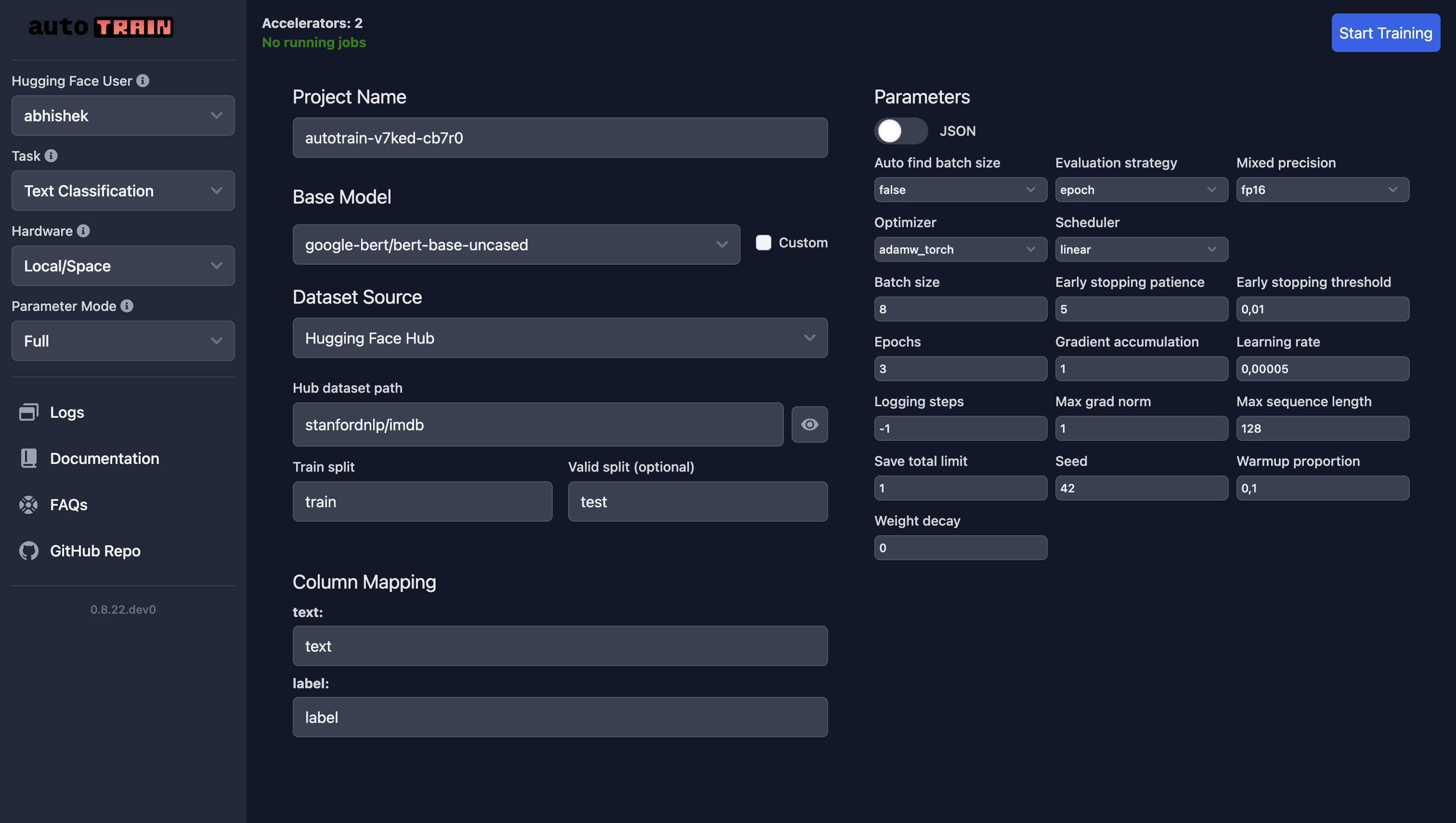
對於文本回歸,您只需選擇“文本回歸”作為任務,其他所有內容都保持不變(當然,除了資料)。
訓練引數
文字分類和迴歸的訓練引數是相同的。
class autotrain.trainers.text_classification.params.TextClassificationParams
< 原始碼 >( data_path: str = None model: str = 'bert-base-uncased' lr: float = 5e-05 epochs: int = 3 max_seq_length: int = 128 batch_size: int = 8 warmup_ratio: float = 0.1 gradient_accumulation: int = 1 optimizer: str = 'adamw_torch' scheduler: str = 'linear' weight_decay: float = 0.0 max_grad_norm: float = 1.0 seed: int = 42 train_split: str = 'train' valid_split: typing.Optional[str] = None text_column: str = 'text' target_column: str = 'target' logging_steps: int = -1 project_name: str = 'project-name' auto_find_batch_size: bool = False mixed_precision: typing.Optional[str] = None save_total_limit: int = 1 token: typing.Optional[str] = None push_to_hub: bool = False eval_strategy: str = 'epoch' username: typing.Optional[str] = None log: str = 'none' early_stopping_patience: int = 5 early_stopping_threshold: float = 0.01 )
引數
- data_path (str) — 資料集路徑。
- model (str) — 要使用的模型名稱。預設為“bert-base-uncased”。
- lr (float) — 學習率。預設為 5e-5。
- epochs (int) — 訓練輪數。預設為 3。
- max_seq_length (int) — 最大序列長度。預設為 128。
- batch_size (int) — 訓練批次大小。預設為 8。
- warmup_ratio (float) — 預熱比例。預設為 0.1。
- gradient_accumulation (int) — 梯度累積步數。預設為 1。
- optimizer (str) — 要使用的最佳化器。預設為“adamw_torch”。
- scheduler (str) — 要使用的排程器。預設為“linear”。
- weight_decay (float) — 權重衰減。預設為 0.0。
- max_grad_norm (float) — 最大梯度範數。預設為 1.0。
- seed (int) — 隨機種子。預設為 42。
- train_split (str) — 訓練集的名稱。預設為“train”。
- valid_split (Optional[str]) — 驗證集的名稱。預設為 None。
- text_column (str) — 資料集中文字列的名稱。預設為“text”。
- target_column (str) — 資料集中目標列的名稱。預設為“target”。
- logging_steps (int) — 兩次日誌記錄之間的步數。預設為 -1。
- project_name (str) — 專案名稱。預設為“project-name”。
- auto_find_batch_size (bool) — 是否自動查詢批次大小。預設為 False。
- mixed_precision (Optional[str]) — 混合精度設定(fp16、bf16 或 None)。預設為 None。
- save_total_limit (int) — 要儲存的檢查點總數。預設為 1。
- token (Optional[str]) — 用於身份驗證的 Hub 令牌。預設為 None。
- push_to_hub (bool) — 是否將模型推送到 Hub。預設為 False。
- eval_strategy (str) — 評估策略。預設為“epoch”。
- username (Optional[str]) — Hugging Face 使用者名稱。預設為 None。
- log (str) — 用於實驗跟蹤的日誌記錄方法。預設為“none”。
- early_stopping_patience (int) — 訓練在沒有改善的情況下將停止的輪數。預設為 5。
- early_stopping_threshold (float) — 用於衡量是否繼續訓練的新最優值的閾值。預設為 0.01。
`TextClassificationParams` 是一個用於文字分類訓練引數的配置類。